
Form 26AS and AIS Mismatch: All You Need to Know Before Filing Your ITR

Table of Contents
- What Is AIS, and How Does It Differ from Form 26AS?
- Why Does an AIS and Form 26AS Mismatch Happen?
- What Should You Do Before Filing Your ITR?
- What Happens If You File Without Sorting This Out?
- How Zaggle's Tax Solution Helps
- Before Filing Your ITR, Ensure That
- Frequently Asked Questions
Key Takeaways
- AIS and Form 26AS are both available through the Income Tax Department, but they do not serve the same purpose.
- A form 26AS and AIS mismatch does not always mean there is a tax error. It may happen because AIS captures a wider set of reported financial transactions, while Form 26AS is mainly used to verify tax credit and TDS/TCS-related information.
- You should review AIS, TIS and Form 26AS before filing your ITR, especially if there are differences in salary, interest, dividend, capital gains, rent, TDS or tax payment details.
- Incorrect AIS entries can be addressed through the AIS feedback option on the Income Tax portal.
- Significant unexplained mismatches may result in tax credit adjustments, refund delays, or communications from the Income Tax Department.
Introduction
While filing your Income Tax Return, you may notice that your AIS and Form 26AS do not show the same details. For example, interest income may appear in AIS but not in Form 26AS. Dividend income may appear in AIS even when no TDS was deducted. A securities transaction may show a large gross value in AIS, while your actual taxable capital gain may be much lower.
Such differences can be concerning, especially if you are worried about reporting incorrect income or receiving a tax notice later. Since both statements are linked to the Income Tax Department, many taxpayers assume they should always match exactly. However, an AIS and 26AS mismatch is not unusual. These two reports are built for different purposes, depend on different reporting sources, and may update at different times.
The important point is this: you should not ignore a form 26AS and AIS mismatch before filing your return. Even if the mismatch is due to a reporting error, timing gap or duplicate entry, it should be reviewed and corrected where required. Reconciling these differences before filing can help reduce the risk of reporting errors and future tax queries.
For more context, you may also read: AIS Guide, Form 26AS Guide and Capital Gains Tax Guide.
What Is AIS, and How Does It Differ from Form 26AS?
AIS, or the Annual Information Statement, is a comprehensive view of information available with the Income Tax Department for a taxpayer. It is designed to show reported financial information before return filing and also allows taxpayers to submit feedback on reported entries.
AIS can include information such as:
- TDS and TCS details
- Salary information
- Interest income
- Dividend income
- Securities and mutual fund transactions
- Property transactions
- Foreign remittance information
- Tax payments
- Demand and refund details
- Other financial information reported by third parties
TIS, or Taxpayer Information Summary, is part of AIS. It provides a category-wise summary of information such as salary, interest, dividend and other reported income categories. TIS can be useful when reviewing pre-filled data before filing the ITR.
Form 26AS, on the other hand, is mainly used as a tax credit statement. Taxpayers commonly use it to verify TDS, TCS and tax credit details before filing.
For practical filing purposes, the difference is simple:
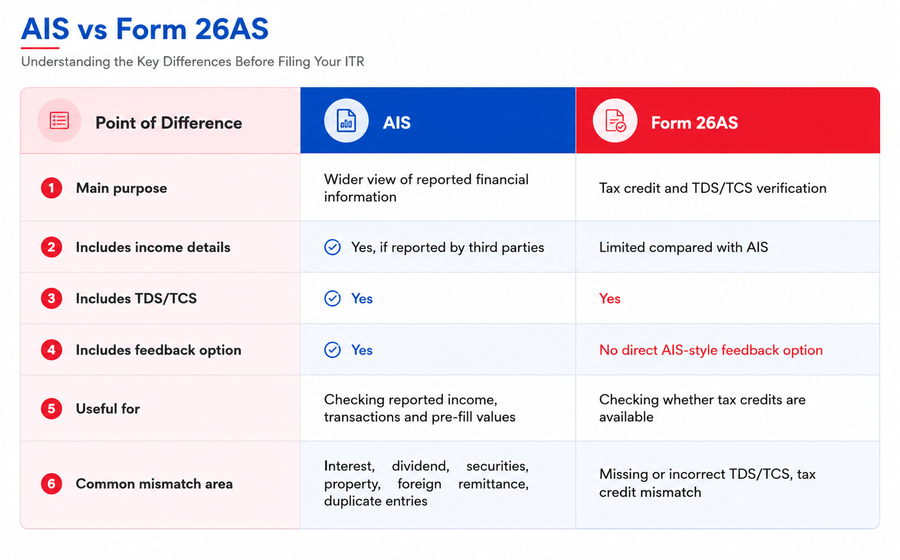
This is why an AIS 26AS mismatch does not automatically mean that one statement is wrong. It often means the two statements are showing different types of information.
Why Does an AIS and Form 26AS Mismatch Happen?
An AIS and 26AS mismatch can happen for several reasons. Some are simple timing issues, while others need correction before filing.
- AIS Reports More Information Than Form 26AS
AIS is broader than Form 26AS. It may include interest income, dividend income, securities transactions, mutual fund transactions, property transactions, foreign remittances and other reported data.
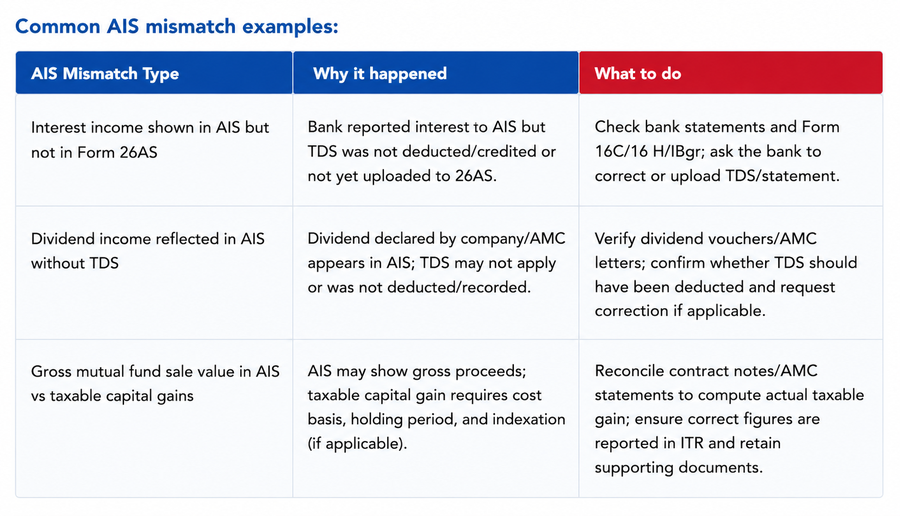
For example, if your bank reports interest income in AIS but does not deduct TDS because the amount is below the threshold, that interest may appear in AIS but not as a TDS entry in Form 26AS. This is not necessarily an error. It simply means the income was reported, but no tax was deducted.
2. Different Reporting Timelines
Banks, employers, brokers, mutual funds, property registrars and other reporting entities may update information at different times. Form 26AS may update after a deductor files or corrects a TDS return. AIS may update when a reporting entity submits or revises financial transaction information.
Because of this, a temporary form 26AS and AIS mismatch can appear during the filing period. The best approach is to download the latest AIS, TIS and Form 26AS before finalising your return.
3. TDS Has Been Deducted but Is Not Visible in Form 26AS
If tax has been deducted from your income but the credit is not visible in Form 26AS, the deductor may not have filed the TDS return correctly. There may also be an incorrect PAN, TAN, challan or amount in the deductor statement.
In such cases, contact the employer, bank, client or other deductor responsible for deducting TDS. The deductor may need to correct or revise the TDS return.
4. AIS May Show Gross Transaction Values
AIS may show the gross value of a transaction, not necessarily the taxable income. This often happens with shares, mutual funds or securities.
For example, your AIS may show the full sale value of mutual fund units. However, your taxable income is not the full sale value. It is the capital gain after considering cost of acquisition, holding period, expenses and applicable tax rules.
This is one of the most common reasons behind an AIS 26AS mismatch or a difference between AIS and your actual tax computation.
For more detail, refer to: Capital Gains Tax Guide.
5. Duplicate or Repeated Entries in AIS
AIS receives information from multiple reporting sources. Sometimes, the same income or transaction may appear more than once. A fixed deposit interest entry, dividend entry, securities transaction or property transaction may be duplicated or partly repeated.
If you notice duplication, do not blindly report the duplicated value in your ITR. Check your bank statement, Form 16A, broker statement, dividend statement or other supporting documents and submit AIS feedback where required.
6. Transaction Linked to the Wrong Financial Year
Some transactions may be reported in a different financial year from the one you expected. This can happen in property transactions, interest accruals, delayed reporting, dividend credits or securities transactions.
Before treating the entry as incorrect, check the transaction date, reporting date, payment date and accounting treatment.
7. Joint Accounts or Co-owned Assets
In joint bank accounts, jointly held deposits, jointly owned property or co-owned investments, information may appear under one PAN even though the income belongs to more than one person.
In such cases, the taxpayer should report only the correct share of income and retain supporting records such as ownership details, bank documents, property documents or investment statements.
8. Incorrect PAN or Reporting Error
A wrong PAN, wrong assessment year, wrong transaction value or incorrect reporting by a bank, broker, employer or other reporting entity may also create an AIS and 26AS mismatch before filing ITR.
This is where the AIS feedback option becomes important.
What Should You Do Before Filing Your ITR?
Fixing the AIS and 26AS mismatch before filing helps reduce the risk of incorrect reporting, tax credit issues, refund delays and avoidable follow-ups. Here is a practical step-by-step process.
Step 1: Download AIS, TIS and Form 26AS
Start by downloading all three documents from the Income Tax portal.
AIS and TIS help you review reported financial information and category-wise summaries. Form 26AS helps verify TDS, TCS and tax credit details.
For more detail, refer to: AIS Guide and Form 26AS Guide.
Step 2: Do not compare only the totals
A direct total-to-total comparison may mislead you. AIS may include income, transactions and reported values that are not meant to appear in Form 26AS.
Instead, compare line items. Check salary details, interest income, dividend income, TDS/TCS entries, securities and mutual fund transactions, property transactions, rent-related entries, foreign remittance details and tax challans, where applicable.
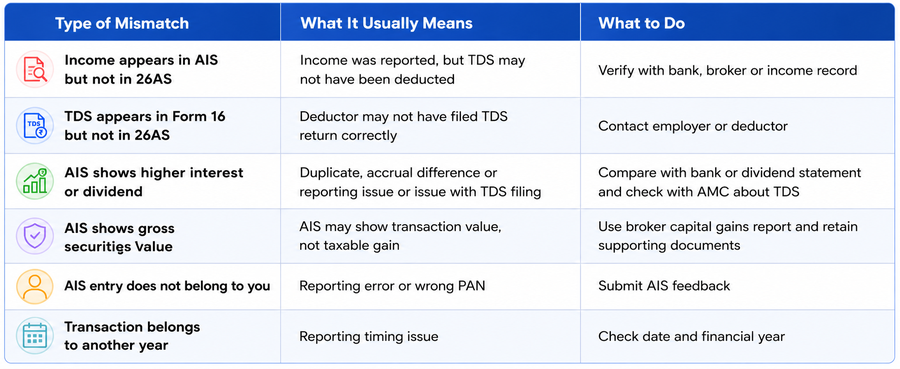
Step 3: Identify the type of mismatch
Classify the mismatch before taking action.
Step 4: Verify the mismatch with your own records
Before submitting feedback or changing your return, compare AIS and Form 26AS with your own documents.
Useful documents include Form 16, Form 16A, salary slips, bank statements, interest certificates, dividend statements, broker profit and loss statement, capital gains statement, mutual fund statement, rent agreement or rent receipts, property purchase/sale documents, TDS certificates and tax challans.
Your ITR should be based on verified income and tax credit information, not on an unreviewed AIS figure.
Step 5: Submit AIS feedback for incorrect entries
If an AIS entry is incorrect, duplicate, overstated or not related to you, use the feedback option on the AIS portal.
This is the correct way to handle an incorrect AIS entry. Do not report incorrect income only because it appears in AIS.
Step 6: Contact the deductor for TDS errors
If TDS was deducted but does not appear correctly in Form 26AS, contact the employer, bank, client or other deductor. The deductor may need to correct or revise the TDS return.
For challan-related mismatches, verify PAN, assessment year, challan number and amount before filing.
Step 7: File your ITR based on correct verified income
After reviewing the mismatch, file your return using the correct figures. If AIS is right, include the income. If AIS is wrong, submit feedback and file based on your actual verified records.
Step 8: Keep supporting documents safely
You may not need to upload every document while filing, but you should keep proof ready. Keep copies of AIS feedback acknowledgements, bank statements, Form 16/16A, broker statements, dividend records and communication with deductors.
This documentation can help if the department later asks for clarification.
What Happens If You File Without Sorting This Out?
Filing without reviewing an AIS and 26AS mismatch can create avoidable issues.
For example, if you report ₹40,000 as interest income in your ITR but AIS reflects ₹75,000, the difference may be flagged during processing and could require further explanation. While this doesn’t automatically result in taxpayers receiving notices, you should maintain supporting documents.
If the department processing system detects a mismatch, you may receive an intimation or communication asking you to review or explain the difference. Significant unexplained mismatches may result in tax credit adjustments, refund delays, or communications from the Income Tax Department.
This does not mean every mismatch will lead to scrutiny. However, unexplained or repeated differences can create follow-up questions.
If you claim TDS or tax credit in your ITR that is not available in Form 26AS, your tax credit may be adjusted during processing. This may reduce your refund or create tax payable.
There is also a difference between a revised return and rectification. If you made a mistake in your submitted ITR and the return has not yet been processed, the correct route is to generally file a revised return. Rectification is used only against an order or intimation, such as an intimation under section 143(1), where there is a mistake apparent from record.
For more detail, refer to: Revised Return Guide and Section 143(1) Notice Guide.
For AY 2026-27, a revised return can be filed before March 31, 2027, or before completion of assessment, whichever is earlier.
How Zaggle's Tax Solution Helps
Reviewing AIS, TIS and Form 26AS can take more time than expected. Taxpayers often need to move between portals, download multiple statements, compare entries manually, identify missing credits and decide whether a mismatch is due to timing, duplication, deductor error or incorrect reporting.
For organisations, this challenge becomes larger. Payroll, finance and HR teams may need to manage employee proof verification, TDS computation, salary restructuring, ITR support, compliance records and follow-ups at scale.
Zaggle supports various tax and compliance workflows, including proof verification, salary restructuring, income tax return filing support, GST-related workflows, TDS computation and reconciliation, and compliance-ready reporting.
A structured tax workflow can help taxpayers and organisations:
- Review tax information before the filing stage
- Track income and tax credit records more systematically
- Reduce manual errors in TDS and income reconciliation
- Maintain supporting documents in an organised workflow
- Identify mismatches before filing the return
- Improve readiness for notices, assessments or follow-ups
- Complete ITR filing with better documentation and process control
A form 26AS and AIS mismatch may look complicated at first, but the right workflow makes it easier to identify the issue, correct what is wrong and file with accurate figures.
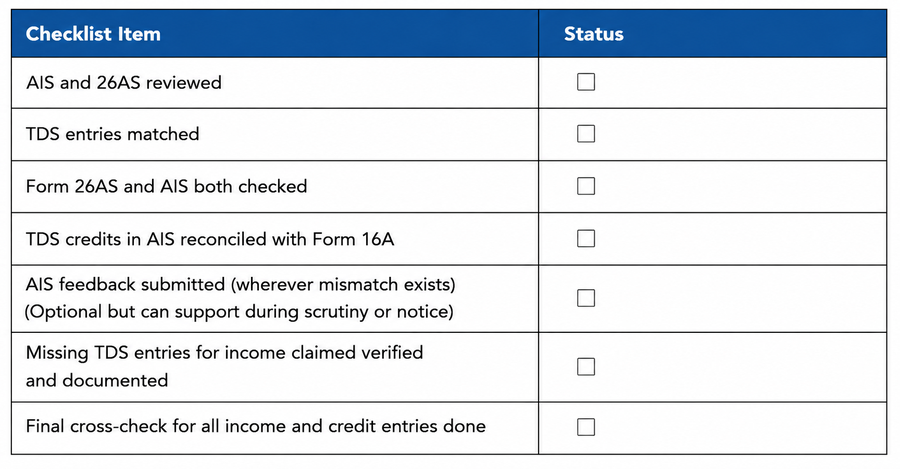
Before Filing Your ITR, Ensure That
Explore TaxSpanner's wide range of calculators for your tax planning and calculations!
View Tools & Calculators